Why Choose China Top Ergonomic Furniture for Productivity?

Time:2026-10-27 Author:Sienna
0%

Why Choose China Top Ergonomic Furniture for Productivity? The question matters in offices where employees spend hours typing, viewing screens, and joining meetings. A poorly fitted chair can create pressure around the lower back, shoulders, and hips. A suitable desk setup can support more comfortable movement throughout the workday. Small adjustments matter.

Why is ergonomic furniture essential for employee productivity? It helps employees maintain healthier working positions and reduce avoidable discomfort. Adjustable chairs, sit-stand desks, monitor arms, and supportive footrests can improve workspace flexibility. In practical use, an employee might raise the monitor to eye level, place both feet firmly on the floor, and alternate sitting with standing. These details can make long tasks feel less demanding. However, ergonomic furniture is not a magic solution. Productivity also depends on lighting, workload, management, and individual health.

China has become an important source of ergonomic office furniture for global buyers. Experienced manufacturers often provide adjustable designs, large-scale production, customization, and competitive pricing. Reliable suppliers should offer clear product specifications, material information, testing records, and warranty terms. Buyers should also inspect lifting mechanisms, frame stability, seat cushioning, and long-term maintenance support. A low price alone proves little. That assumption can be wrong.

The strongest choice combines comfort, durability, verified quality, and responsible sourcing. Product demonstrations and user feedback can reveal problems that photographs hide. A chair may look modern but feel rigid after two hours. A desk may rise smoothly but wobble at its highest setting. Careful evaluation remains essential. Better furniture supports people, not just office appearance.
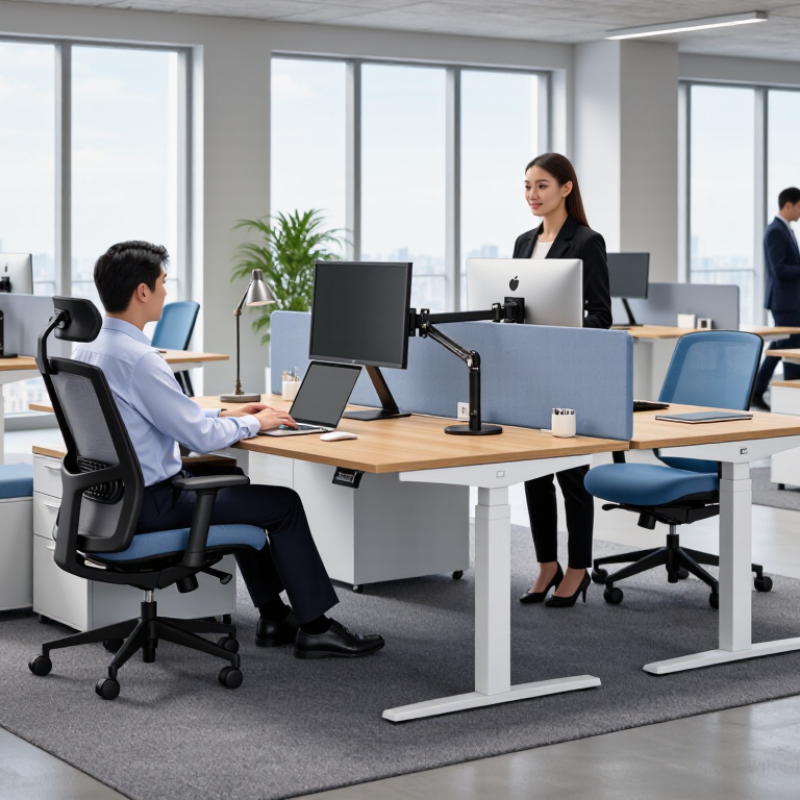
Why Choose China Top Ergonomic Furniture for Productivity?

What Defines China’s Top Ergonomic Furniture?

What defines China’s top ergonomic furniture? It is not a low price or a futuristic appearance. It is measurable support, consistent production, and practical adjustment. A strong office chair should let users change seat height, depth, backrest angle, and armrest position. These details help different bodies maintain a neutral posture. ISO 9241-5 also emphasizes workspace design that supports healthy posture and movement.

Reliable manufacturers combine engineering with user testing. They check foam resilience, frame strength, caster durability, and adjustment cycles. Material traceability matters too, especially when furniture is used for eight hours daily. The U.S. Bureau of Labor Statistics reported that musculoskeletal disorders represented 27% of days-away-from-work cases in 2022. That figure shows why comfort should be tested, not simply advertised. Still, no chair can solve every problem. Poor monitor height and long, motionless sitting remain common weaknesses.

Tips: Adjust the seat so your feet rest flat. Keep elbows near 90 degrees. Change posture every 30 to 45 minutes. Ask for test reports based on recognized standards, and inspect warranty terms before ordering. A supplier’s factory audit, quality records, and replacement-part policy reveal more than polished product photos. Some products look excellent during a short demonstration, yet feel too firm after several hours. That uncomfortable detail deserves attention.

How Ergonomic Design Supports Workplace Productivity

China’s top ergonomic furniture can support productivity when design meets real working habits. Adjustable chairs, desks, and monitor arms help keep screens near eye level and feet firmly supported. This reduces awkward reaching and repeated neck bending during long tasks. The World Health Organization reports that depression and anxiety cost the global economy about US$1 trillion yearly through lost productivity. Physical discomfort can add to that hidden burden.

Research supports practical adjustments. A Cochrane review found sit-stand desks reduced workplace sitting time, especially in the short term. Yet furniture alone is not a cure. I have seen employees lower adjustable desks too far, then lean toward the screen. Small errors matter. Better products should offer clear controls, stable frames, breathable materials, and dimensions suited to different body sizes.

Tips: Set the monitor about an arm’s length away. Keep elbows close to your body. Change posture every 30 to 45 minutes. Test the chair before making a large purchase. Track comfort, focus, and fatigue for two weeks. The U.S. Occupational Safety and Health Administration recommends fitting the workstation to the user, not forcing the user to fit the furniture. That principle sounds simple, but busy offices often ignore it. Productivity improves through consistent habits, measured adjustments, and furniture that supports them.

Why Choose China Top Ergonomic Furniture for Productivity? - How Ergonomic Design Supports Workplace Productivity

Ergonomic Design Dimension Evidence-Based Target or Measurement How It Supports Productivity Reference Basis
Adjustable chair height Adjust the seat so the feet are supported on the floor and the knees remain close to a right angle. Improves lower-limb support and helps reduce discomfort that can interrupt focused work. OSHA Computer Workstations eTool
Lumbar and back support The backrest should support the lower back and allow the user to maintain a neutral, supported sitting posture. Supports sustained sitting comfort and may reduce posture-related fatigue during desk-based tasks. OSHA Computer Workstations eTool; ISO 9241-5 principles
Seat depth and edge design The seat should support the thighs without pressing behind the knees, leaving a small clearance between the seat edge and the lower legs. Helps maintain circulation and allows users of different body sizes to work comfortably. ISO 9241-5 ergonomic workstation guidance
Armrest adjustability Armrests should support the forearms without raising the shoulders or restricting the desk position. Reduces unnecessary shoulder loading and supports comfortable keyboard and mouse use. OSHA Computer Workstations eTool
Monitor height and distance Position the top of the screen at or slightly below eye level, with the monitor approximately 50–100 cm from the user, depending on screen size and visual comfort. Helps limit repeated neck flexion and excessive visual effort during screen-based work. OSHA Computer Workstations eTool; ISO 9241-5
Desk height and leg clearance Provide sufficient clearance for the knees and legs; adjustable-height desks should allow seated and standing positions to be set for the individual user. Enables posture changes and accommodates different users, tasks, and body dimensions. OSHA Computer Workstations eTool; ISO 9241-5
Keyboard and mouse alignment Keep the keyboard and mouse close to the user, with the wrists generally straight and the elbows near the sides of the body. Supports efficient input and helps reduce awkward wrist, arm, and shoulder positions. OSHA Computer Workstations eTool
Sit-stand flexibility Allow users to alternate between sitting and standing rather than remaining in one static posture for extended periods. Introduces posture variation and may help manage discomfort during prolonged computer work. NIOSH guidance on reducing prolonged sedentary work
Movement and micro-break support Combine ergonomic furniture with regular brief movement, task variation, and position changes throughout the workday. Helps reduce static loading and supports sustained attention during repetitive tasks. NIOSH and OSHA workplace ergonomics guidance
User-fit and adjustability Furniture should provide independent adjustments for seat height, back support, arm support, screen position, and work-surface height. Improves workstation fit across different body sizes, job roles, and shared-office environments. ISO 9241-5 ergonomic design principles

Note: Ergonomic furniture supports productivity most effectively when it is correctly adjusted for the individual user and combined with good workstation setup, appropriate lighting, and regular movement.

Which Features Improve Comfort, Health, and Focus?

Choosing top ergonomic furniture from China can improve comfort, health, and focus when design follows measurable standards. Look for chairs tested against EN 1335 or similar requirements. Adjustable seat height keeps both feet flat, while lumbar support follows the lower back’s natural curve. A 2022 Cochrane review found sit-stand desks reduced workplace sitting by about 77 minutes daily in the short term. That change matters, although it does not replace regular movement.

Comfort also depends on small details. Adjustable armrests can keep shoulders relaxed during long typing sessions. A monitor arm can place the screen near eye level and reduce repeated neck bending. The Occupational Safety and Health Administration recommends neutral wrists, supported feet, and frequent posture changes. These features may improve focus by reducing physical distractions. Still, furniture alone cannot fix poor habits. Even an excellent chair becomes ineffective when adjusted once and ignored.

Tips: Set the seat so your knees stay near 90 degrees. Keep the screen about an arm’s length away. Alternate sitting and standing every 30 to 60 minutes. Walk briefly between tasks. Test the chair for several days, because first impressions can be misleading. Check adjustment ranges, load ratings, material durability, and available testing documents before purchase. Lower prices may look attractive, but weak mechanisms can create discomfort and replacement costs.

Why Choose Chinese Manufacturers for Ergonomic Furniture?

Chinese manufacturers have become a practical choice for ergonomic furniture because they combine production scale, design flexibility, and competitive costs. Many factories support adjustable desks, ergonomic chairs, monitor arms, and customized workplace systems. Their experience with overseas orders can also simplify packaging, documentation, and delivery planning.

However, low prices should not decide everything. A reliable manufacturer should provide material specifications, load testing, adjustment-cycle results, and quality-control records. Ask for a sample before placing a large order. Check the desk frame for wobbling, listen for unusual motor noise, and test whether the chair supports the lower back without forcing an unnatural posture. A sample may look excellent, but bulk production can still vary. This is where factory audits, inspection plans, and clear contracts become important. Independent testing can add confidence, especially when furniture will be used daily.

Tips: Compare at least three suppliers. Request recent test reports. Confirm warranty terms and replacement-part support. Measure your users, floor space, and monitor height before discussing customization. Do not ignore after-sales communication; slow replies often signal future delays. Chinese manufacturers can offer strong value, but buyers still need evidence, not promises. Even experienced purchasers sometimes focus too heavily on appearance and forget long-term comfort. A better decision balances ergonomics, durability, compliance, logistics, and real user feedback.

How to Select the Right Ergonomic Furniture for Your Needs

Why Choose China Top Ergonomic Furniture for Productivity?

Selecting ergonomic furniture should begin with your body, tasks, and room dimensions. A premium-looking chair can still fail if its seat depth leaves pressure behind your knees. Measure your desk height, monitor distance, and available legroom before comparing products. Adjustable seat height, lumbar support, armrests, and backrest tension should match your daily movements.

The U.S. Bureau of Labor Statistics reported that musculoskeletal disorders represented about 28% of workplace cases involving days away from work in 2023. This figure does not prove that furniture alone causes injury. It does show why workstation design deserves careful attention. Look for products tested against recognized ergonomic or furniture safety standards. Check adjustment ranges, weight capacity, materials, warranty terms, and replacement-part support. China’s large manufacturing sector can offer varied configurations, but lower price should not replace documented testing. That is an uncomfortable point.

Tips: Sit with both feet supported. Keep your elbows near 90 degrees. Place the monitor near eye level. Change posture regularly, because no chair can correct eight motionless hours. Try the furniture for at least several minutes, not just a showroom pose. A small mistake in measurement can become daily discomfort. The World Health Organization’s physical activity guidance also encourages reducing sedentary time, so include brief walking or stretching breaks. Personal experience matters here: the “perfect” setup may still need adjustment after real work begins.

Why Choose China’s Top Ergonomic Furniture for Productivity?

How to Select the Right Ergonomic Furniture for Your Needs

Choose furniture with enough adjustability to support a neutral posture. The reference ranges show practical workstation dimensions: chair height should allow feet to rest flat, desk height should support relaxed shoulders, and the monitor should remain at a comfortable viewing distance. Individual body size and working style should always be considered.

Reference guidance: U.S. OSHA Computer Workstations eTool and general ergonomic workstation recommendations. Measurements are shown in centimeters.

FAQS

How can ergonomic furniture support workplace productivity?

Adjustable chairs, desks, and monitor arms reduce awkward reaching and repeated neck bending. Comfort supports focus. Better posture may reduce physical distractions during long tasks.

What chair features should I look for?

Choose adjustable seat height, lumbar support, armrests, and backrest tension. Both feet should rest firmly on the floor. The seat should not press behind your knees.

How should I position my monitor?

Place the screen about an arm’s length away. Keep its top near eye level. This reduces repeated neck bending and forward leaning.

Do sit-stand desks reduce sitting time?

Research suggests they can reduce sitting, especially during the short term. One review reported about 77 fewer sitting minutes daily. They do not replace walking or stretching.

How often should I change posture?

Change position every 30 to 60 minutes. Walk briefly between tasks. Even good furniture fails during eight motionless hours.

How can I choose furniture for my body and room?

Measure desk height, monitor distance, seat depth, and available legroom. Check adjustment ranges and weight capacity. A showroom pose can mislead you.

What should I check before buying ergonomic furniture?

Review adjustment mechanisms, material durability, warranty terms, and replacement-part support. Look for documented safety or ergonomic testing. Low price can hide weak mechanisms.

Can ergonomic furniture solve discomfort by itself?

No. Furniture supports habits; it cannot replace movement or correct every setup mistake. I have seen desks adjusted too low, causing users to lean forward. Small errors matter.

Conclusion

China’s top ergonomic furniture combines thoughtful design, reliable construction, and practical support for modern workplaces. Adjustable desks, ergonomic chairs, monitor stands, and supportive accessories are designed to encourage healthier posture, improve movement, and adapt to different body types and working styles. Why is ergonomic furniture essential for employee productivity? When employees experience less discomfort and fatigue, they can maintain better concentration, work more efficiently, and remain engaged throughout the day. Features such as adjustable seat height, lumbar support, flexible armrests, spacious work surfaces, and height-adjustable settings can improve comfort, health, and focus.

Chinese manufacturers are often chosen for their broad product selection, adaptable production capabilities, competitive value, and ability to meet diverse workplace requirements. When selecting ergonomic furniture, consider adjustability, durability, user comfort, available space, design compatibility, and long-term maintenance needs. The right solution should support both individual employees and the overall working environment, creating a healthier, more productive, and comfortable workplace without sacrificing practicality or quality.

Sienna

Sienna

Sienna is a skilled marketing professional with a deep expertise in our company’s core products and services. With a passion for innovation and detail, she plays a pivotal role in crafting insightful blog posts that not only highlight the unique features of our offerings but also provide valuable......